Original: Read on Medium This is a migrated version of the Medium post for this blog.
@layer: A New Paradigm for CSS Priority
Introduction
If you build web interfaces, you have probably run into style conflicts caused by CSS cascading behavior. CSS introduced @layer to address this problem. With @layer, you can organize stylesheets into logical layers and explicitly control their priority.
After using @layer directly, I found it significantly improved maintainability. It also made styles feel more modular and provided a better collaboration experience in team development.
1. What Is CSS @layer?
"A feature that lets you manage style priority through layers."
The CSS @layer rule is a feature that helps manage style priority within a stylesheet. You can split styles into layers and control how those layers are prioritized.
2. Layer Priority Rules
Defining Priority Order
- Priority between layers is determined by declaration order. For example, if
@layer baseis declared before@layer theme,basehas lower priority, so conflicting styles in the laterthemelayer will win.
@layer base {
  h1 {
    font-size: 2em;
    margin-bottom: 0.5em;
  }
}

@layer theme {
  h1 {
    color: #0056b3;
  }
}- You can declare multiple layers at once. This is different from declaring one layer at a time. Predeclaring layer order and defining styles later is often easier to read. Once layer order is declared, priority remains stable even when adding styles later.
reset (lowest priority)
base
theme
utilities (highest priority)
@layer reset, base, theme, utilities;

@layer utilities {
  .item {
      color: #0056b3;
   }
 }

@layer base {
  .item {
      color: #0056b3;
   }
}- Styles with
!importanthave the highest priority within the same layer. When conflicts happen, priority can effectively reverse. - Styles declared outside any layer always outrank styles inside layers.
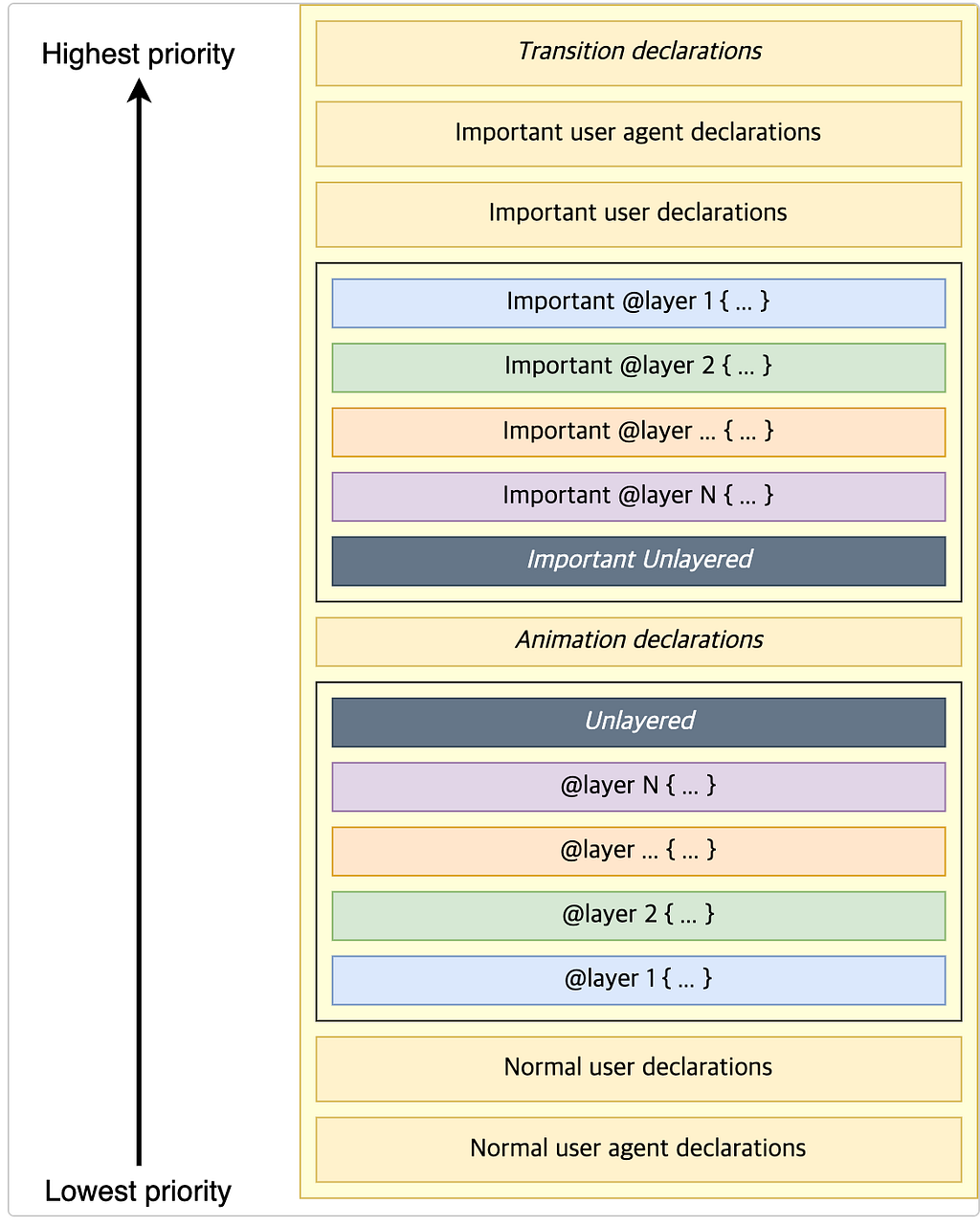 Source: https://developer.mozilla.org/en-US
3. Creating Layers
You can declare @layer like this:
Anonymous Layers and Named Layers
@layer {
  /* style rules */
}
@layer base {
/* style rules */
}Anonymous layers follow declaration order by default. Named layers let you manage priority more explicitly.
Combining @layer and @import
@import url('styles.css') layer(base);With this syntax, all style rules in styles.css are placed inside the base layer.
4. Adding CSS Rules
When styles are applied, overriding occurs as expected. If the same .alert rule exists in multiple layers, duplicated rules are redefined by the layer with higher priority.
@layer module, state;
@layer state {
.alert {
background-color: brown;
}
p {
border: medium solid limegreen;
}
}
@layer module {
.alert {
border: medium solid violet;
background-color: yellow;
color: white;
}
}
// example.html
// <p class="alert">Beware of the zombies</p> Result
Conclusion
Because @layer is still relatively new, support may vary across browsers. Always check compatibility for your target browsers first. If needed, provide fallback styles or use preprocessors/postprocessors to handle compatibility concerns.
Also, overusing layers can increase CSS parsing time. If your team agrees on a clear layer structure and documents it well, you can maintain CSS rules in a much more sustainable way.
Thanks for reading :)
Reference: https://developer.mozilla.org/en-US/docs/Web/CSS/@layer